

DIGITAL
EVIDENCE MANAGEMENT
FOR LAW ENFORCEMENT
LENSLOCKER™ DIGITAL EVIDENCE MANAGEMENT
Upload evidence from the field. Share video securely with the DA. Redact sensitive information. Manage body camera video, in-car video, fixed-camera footage, photos, audio, and third-party evidence in one FBI CJIS-compliant platform backed by Microsoft Azure Government Cloud.
EDIT. SHARE. MANAGE.
LensLocker helps law enforcement agencies move digital evidence from upload to review, redaction, sharing, and case organization in one secure CJIS-aligned system. Officers, administrators, investigators, and approved external users can work from the same evidence workflow instead of passing files between disconnected tools.

USER FRIENDLY & SECURE
LensLocker™ simplifies how law enforcement administrators control access permissions for their teams. Agency-specific roles and full chain-of-custody reporting help agencies control who can access evidence, what they can do with it, and when activity is recorded. Multiple role layers keep team access defined around the agency’s needs.
UPLOAD. TAG. SHARE.
Upload evidence, add the details that matter, and share files securely from one workflow. LensLocker™ simplifies metadata entry for case number, encounter type, tags, comments, and other case details so evidence is easier to find during review. Evidence can be shared with prosecutors and public defenders with full chain-of-custody reporting.
UNLIMITED DATA
LensLocker™ Digital Evidence Management includes a truly unlimited data plan that eliminates data overage charges and hidden fees. Uploaded evidence is securely stored in Microsoft Azure Government Cloud and can be accessed through a secure internet connection.
THIRD-PARTY EVIDENCE
Upload third-party evidence from witnesses, commercial surveillance systems, city surveillance cameras, and other responding law enforcement agencies. Incoming files are tagged with source data for easier tracking, reporting, and case organization.
LENSLOCKER™ MOBILE
PROTECTED ACCESS
Securely access LensLock body-worn camera video in the field. LensLocker™ Mobile wirelessly connects to the camera and can help upload body camera footage using the mobile phone’s cellular network connection. Cellular data rates may apply.
RECORD AND UPLOAD
Securely capture photo and video evidence using LensLocker™ Mobile. Use it for crime scene evidence, accident investigations, property damage, and injury documentation. Once captured, tag the evidence with case number, encounter type, and other details, then securely upload it to LensLocker™ Digital Evidence Management.
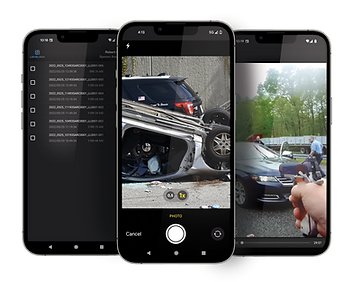
IN-FIELD METADATA
Review and tag body-worn camera evidence in the field using LensLocker™ Mobile. Add case number, encounter type, relevant tags, and other details before the end of the shift.
TRAINING RESOURCE
Turn LensLock cameras into training resources. Body-worn camera video can be accessed in the mobile application to review officer response during training. Add training notes and observations to support follow-up review.
Genesis 12 & 12.5 cameras
-
Access and review existing videos
-
Tag and add case information in the field
-
Upload evidence via Wi-Fi
Eagle 13 cameras
-
Record new evidence directly from your phone
-
Upload evidence via cellular
-
For video review and tagging, use LensLocker web portal
KEY CAPABILITIES
CELLULAR UPLOAD
Unlimited T-Mobile 5G cellular upload from the field. Skip the station run. (Satellite coming soon)
REDACT EASILY
Self-service tools help redact faces, license plates, IDs, tattoos, and audio details.
SHARE IN SECONDS
Send videos to DA, court, other agencies via secure link. Or give them portal access
THIRD-PARTY UPLOADS
Citizens can upload witness footage directly to your portal via secure link.
ORGANIZE BY CASE
Tag evidence by case number, officer, incident type. Find it fast when you need it.
FULL AUDIT TRAIL
Chain of custody tracking. Know who accessed what and when.
FREE EVIDENCE MANAGEMENT FOR LENSLOCK CUSTOMERS
Use LensLock body cameras? Evidence management is included. Store video, photo, audio from your LensLock equipment along with third-party camera uploads at no additional cost.
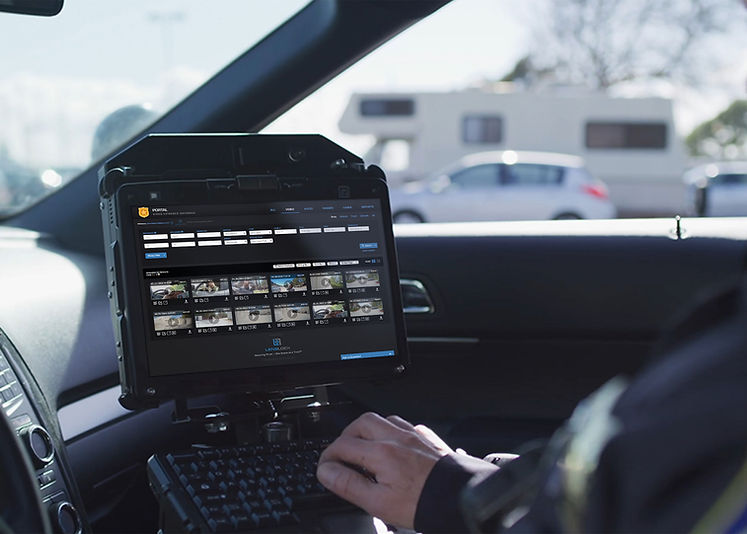
Built-In Redaction
With LensLock, redaction is simple. Facial recognition is used to display each person in the video. The user selects which faces to redact. Users can also redact distinctive tattoos, license plates, and audio data such as names or other personal details.
Case Organization
Sort evidence by date, time, encounter type, and case details. Attach third-party video to the right case for easier review.
CJIS-Compliant Cloud Storage
All LensLock solutions use the secure and CJIS-FBI compliant cloud storage offered by the Microsoft Azure Government Cloud.